
Facility management
Facility Management
Add, edit, and manage your factories and sub-facilities on the platform. Control all your sites from a single center with a hierarchical structure and user access assignments.
Panel & Action Flow
Which button opens what? Select below to preview the screen.
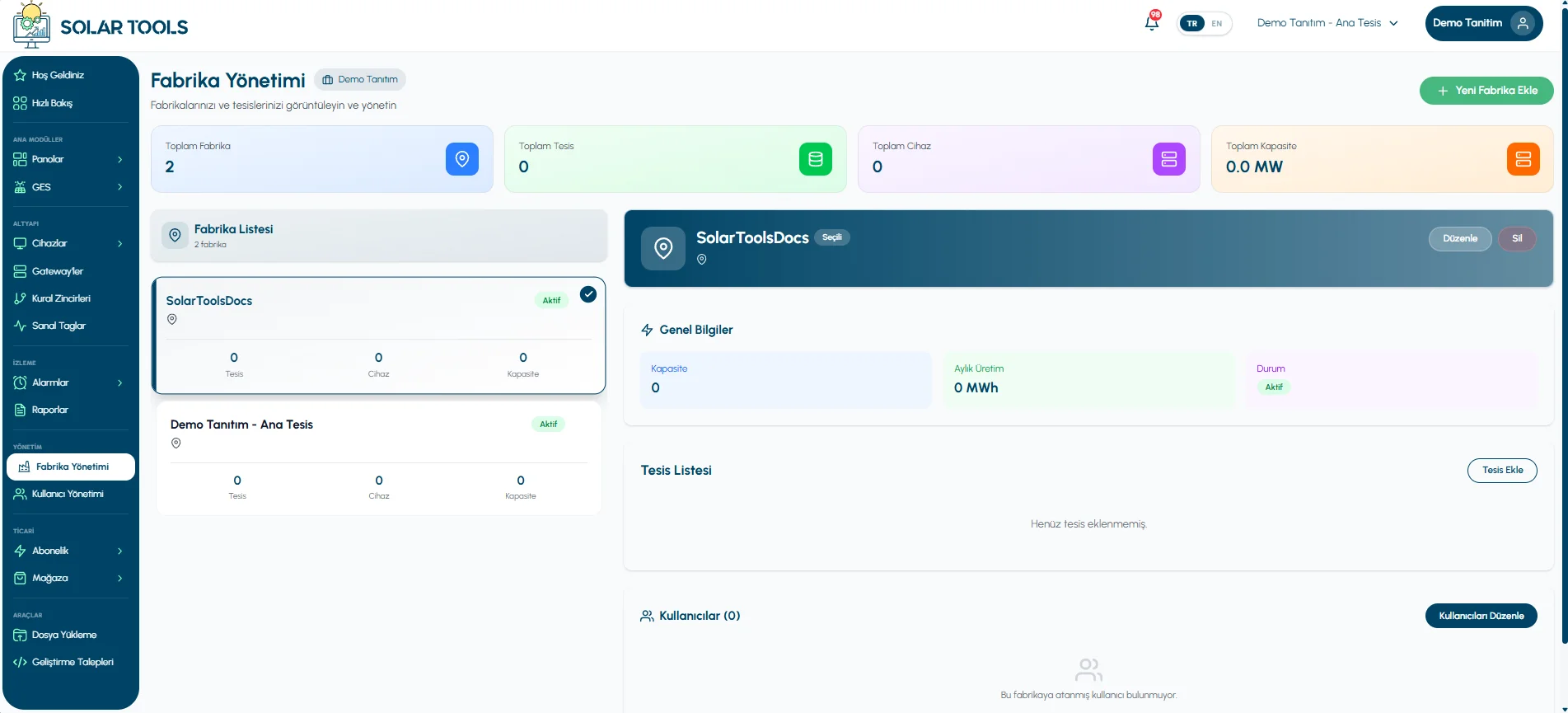
View all your factories, their sub-facilities, and the users assigned to each facility in one screen.
Main panel listing all factories and facilities connected to the organization.
Facility Management Panel
The central screen for managing your organization's factories and facilities.
The Facility Management module lets you manage the physical factories linked to your organization and the facilities beneath them in a hierarchical structure. Each factory is an independent entity; multiple facilities (production lines, buildings, areas, etc.) can be defined under each factory. Users are granted access at the facility level.
Factory Creation
Create new factory records with name, location, description, and logo; edit them later.
Facility Addition
Define sub-facilities such as production lines, warehouses, or buildings under each factory.
User Management Link
The Edit Users button redirects you directly to the User Management page for access assignments.
Instant Updates
Edit factory or facility information; changes are reflected immediately upon saving.
Location Info
Define city, country, or address information for each factory for geographic tracking.
Facility-Based Access
Users can only access data of the facilities they are assigned to — full data isolation.
Hierarchical Structure
Organization → Factory → Facility — the three-layer structure is the foundation of all access control.
Hierarchy Logic
A Factory can contain multiple Facilities. User assignment is done at the facility level, so the same user can be assigned to different facilities across different factories.
Adding a New Factory
Follow these steps to add your first factory to the platform.
Open the Form
Fill in the Details
Save
Adding a Facility to a Factory
To define a new facility (line, building, area) under an existing factory:
Select a Factory
Enter Facility Details
Save
Screenshots
A quick look at all screens available in the Facility Management panel.
All Screens
The main management screen listing all factories and facilities.
The registration form opened by the "Add New Factory" button.
The form opened to edit existing factory information.
The form opened to add a new facility under a factory.
Edit Users
User assignments per facility are managed from the User Management page.
User Assignment — User Management
When you click the Edit Users button next to a facility on the Facility Management page, you are redirected directly to the User Management page. From there you can assign team members to the relevant facility or update existing assignments.
Tip
Owner / Admin Only
Creating, editing, deleting factories, and adding facilities can only be performed by users with Owner or Admin roles. Member and Viewer roles cannot access this page.